I Let an AI Into My Homelab
Part 1 of a multi-part series about bringing Loop Engineering from Coding to InfraOps.
Most experts, myself included (PhD, CTO, consultant) will tell you “Do not let AI on your servers; you’ll be another case of ‘AI did an rm -rf on production!’” Becoming a parent left my homelab neglected - missed security patches, dead hard disks in my RAID, silently failing alert notifications, EOL software, etc. To get back on top of it without spending time I don’t have, I broke the rule and used AI for InfraOps. Surprisingly, I don’t see myself ever going back - my homelab is both more secure and far more useful than it has been in years.
To make it reasonably safe, I borrowed the techniques I use at my day job applying AI to mission critical, regulated, and safety sensitive domains: deterministic workflows, guardian agents, persistence prompting, etc. These mapped to home network maintenance more directly than I expected.
The end result is a network that’s maintained, brings me joy again, and does more than before. With zero new hardware, I’m running far more software than before, and I can now test drive a new tool in minutes instead of hours.
The big caveat: My target for this work is not an enterprise-class-handles-customer-data service. This is a home network I’ve been ignoring for years. Don’t takeaway “AI can replace my infra team!” because it’s dangerously wrong.
AI agents, with appropriate guardrails, can significantly improve small-scale InfraOps
What can it actually do?
Remember, I can do all of this on my own. Using AI buys me time and comprehensiveness, but still requires a fair bit of judgement and discrimination. Here is a small sample of what we got done together:
-
Finished a RetroPie setup I’d abandoned. My son and I can finally play Mario, and I now regularly get asked to “kill the goombas” 🙂 To get us playing, AI diagnosed and fixed a slew of issues
- Wrong kernel module caused ghost button presses on my wireless controller. AI built a script to record all controller input and had me push buttons/joystick as needed. We tried a few modules, found a working one
- A bad ALSA config led to no audio over HDMI. AI fixed by writing helper scripts to play tones (left/right mono and speaker tones) while I sat in front of the TV
- Clarified why RetroPie seemed broken-on-install. Turns out the project is not dead, they just stopped updating pre-built images, so my image download was launching into an EOL operating system. Swapped to a weekly build and all issues disappeared
The actual return on all that yak-shaving. Sound on. -
Confirmed server backups were running. One was not, for non-trivial reasons. See below for the full story
-
Triaged eight spare HDDs into sell-or-discard by running SMART tests over a four-day period (off to eBay with 6 of 8!)
-
Fixed monitoring systems that had been silently dead: a disk temperature daemon that had crashed, and a Prometheus exporter bound to the wrong address that had not reported in years
-
Migrated ~300GB of data from an almost-full SSD to a NAS, configured NFSv4 mount
-
Cleared out years of accumulated cruft: four different Java installations from prior contracting work, over 100 accumulated “local” (non-apt-managed) packages, a dead ELK stack, leftover nginx vhosts
All of this was on my “I should really get to that” list that was never going to get done. My gap was time and attention, not judgement or ability, so using AI to investigate+propose while maintaining review+approval with myself worked well.
Subject matter expertise is more, not less, valuable in the genAI world. It prevents plausible-sounding nonsense
Getting Started: sudoless SSH with a tool guardian
I started with a tiny skill (Markdown file of instructions) to auto-trigger when I mentioned “ssh into server.” Effectively one line of instruction: “Find the referenced server in ~/.ssh/config, ssh in, and gather info to answer the user’s query. You are READ ONLY, you should NOT cause any side effects. You do not have sudo permission”.
That’s it - my entire starting dependency. I didn’t setup a special agent account or install anything. Just used a line of instruction text and the SSH access I was already using.
Guardrails at this stage
-
withhold
sudo- You should double-check that your remote login does not have passwordless (akaNOPASSWD) sudo access -
Use an auto mode. This is critical - without it you will either be swamped in permissions requests OR have to use some “allow all” flag. Instead, use an independent agent that reviews tool calls before they run e.g. a “model in the tool approval loop”. Most serious harnesses today have this - for Claude it’s called ‘auto mode’, Codex has ‘auto-review’, OpenCode has OpenGuardRails plugin, etc. The “guardian” LLM acts as an independent verification that your main LLM isn’t trying to
rm -rf.Note for advanced readers: At 522 Software, part of building complex systems is tuning guardians for the use case e.g. policy adherence, safety, etc. A guardian is a great tool to keep business concerns measurable and distinct from the base model choice and inversely apply Conway’s Law to avoid organization resistance. In an org with an existing split of security/policy and product/engineering, designing a system where one team controls the policy guardian and a different team controls the base responses can make a solution more adoptable
Be aware that this is not yet “secure” - a model can still read a private ssh key from the box and then leak it, or be convinced to curl+execute a remote script, or multiple other failure modes. This is a minimal security posture to prevent most obvious gotcha mistakes
If you want to try this, start here: SSH, a prompt saying read-only, confirm sudo on the box(es) requires a password, and use Claude’s auto mode
My first task: verify backups
My first ask of the AI was to confirm offsite backups were running without error.
Of the three other servers, two were fine. On my network storage server (NAS), AI found the backup process starting and then immediately dying. It was getting out of memory killed on a machine with 32 GB of RAM. Web search found an issue report that seemed to match: a TrueNAS memory leak that surfaces under a narrow set of conditions and slowly starves the system until it starts killing processes. This is a homelab, so I can restart the leaking daemon without pain. Backups ran and we scheduled a delayed (two-day) one-off script to check if the leak had come back and notify me. That scheduled script was the AI being more comprehensive than I would. When it did come back and still seemed to match the reported memory leak, we setup an auto-restart every few days. Done - issue resolved in my head as “better than before”.
I know how to check if backups are working, and I know how to determine a root cause, but I didn’t have energy to dig into this late at night. The agent went three hops deeper than I would have, found a systemic problem I didn’t know I had, handed me a clear set of findings that passed my smell test.
What sold me initially wasn’t raw intelligence — it was diligence. Knowing and doing are very different things
Adding KISS memory
Agents were repeatedly investigating the same basic server state/setup, so I made a few changes to get the simplest persistent memory setup I could. (During this process, I had to remind myself to “Keep it simple, stupid” repeatedly)
-
Updated my skill to prompt me to “finalize this session”
-
“finalize” would trigger a few things:
-
Write out lessons-learned to a server-docs repo on my system
-
Optionally write ‘helper binary’ scripts for future reuse (passed via
ssh <host> <script>) -
git commitchanges to server-docs. Later on, git hooks became a useful place to trigger side-effects like checking server docs for broken links, auto-re-generating the index, converting the server-docs to HTML and publishing the new version
-
-
Updated ssh-to-server skill to read an index of the server-docs repo at startup. This is Context Tiering - the skill stays tiny but has an index to per-host docs, per-host docs are slightly larger and have their own index to per-service docs. The skill file contains content that is relevant to 100% of chats and is a router to content that is relevant to only some chats
-
Added standard InfraOps docs best practices: write stable data, not volatile stuff like PIDs, sort data into per-host
folders, add ‘last confirmed’ markers -
For cross-host setups (like a service that needs an NFS mount) I settled on writing the contract between the hosts into a distinct cross-host folder and letting the per-host implementation details settle naturally into the per-host location
-
After a few days of this, I added a
task_queue.mdfile and told the skill to store tasks there. That worked well for a while (under 50 tasks), but eventually got unwieldy. First I tried applying Context Tiering here -task_queue.mdbecame mostly an index with a one-line summary and there was atask_info/folder with deep tier-2 investigations. That scaled me to ~200 tasks, after that I finally chose to externalize to a task management system
A basic server-documentation folder lets every session start from the same baseline. Don’t categorically trust the docs you already have more than AI-generated docs - I found inherited documentation is not safer than generated documentation, it’s just older.
So what did it get wrong?
Plenty, and the interesting part is how each one got stopped. Roughly in order: the guardian caught some subtle ones, I caught issues that needed context the AI didn’t have, and the errors that actually got past us both were all documentation.
Stopped by the guardian. Three of these:
-
Fine now, breaks later. An agent ran
docker compose pullto check for newer container versions. The guardian caught that this writes a newlatestimage. Neither main AI or the guardian knew that this container gets auto-restarted once a week (internal memory leak) - so a pull today could have caused a failure seven days later -
Over-querying without considering resources. An agent went to read my Prometheus contents, confused itself, and asked for a multi-year window at a
1 secondtimestep. The guardian blocked it as “probably wrong”, which it definitely was -
Incorrectly assuming read-only. An agent tried to
GETPlex’s library metadata refresh endpoint, which actually triggers a full library scan. Another agent tried to grab a snapshot of my Prometheus data for analysis, not realizing the snapshot API creates a snapshot on disk. Both were blocked by the guardian. My guess is the agent was confused by typical semantics - aGETverb is supposed to mean read-only, and snapshot could mean read-only - while the guardian looked for risk
Stopped by me, including when the guardian was wrong.
-
Over-protective. The guardian initially blocked the main agent from writing scripts that would violate the read-only prompt - things like
sudo apt-get updateandsudo certbot renew. This was a prompting mistake, so I updated the base prompt to allow drafting any script -
Missing context. The AI proposed undoing work because it didn’t know why I had configured something a particular way. The “finalize this session” loop fixed this quickly - once the reasoning was provided once it persisted in new sessions
Landed anyway. Past the guardian, past my review, into published docs:
-
Bad docs. An agent wrote eight documents and every one ended with a fragment of the agent’s own tool-call format - a literal
</content>sitting in the body text. It passed my doc linting and sat published for days until a static site build tried to parse</content>as a closing tag with no opener and choked -
Wrong facts. A wrong IP address recorded for my NAS. What caught it was a verification pass I ran over the docs a day later: one sub-agent per document, checking each claim against live state instead of against the document. That same pass corrected a doc I had written by hand, which had the wrong boot disk.
The useful question is not “will it be wrong.” It will be. The question is what your independent checks will catch. Be honest that for a whole category of ‘wrong’ the answer is nothing you have built yet.
WTF moment
I have a home server with a BMC (baseboard management controller: a small always-on chip that lets you manage the machine even when it’s powered off). In theory these are amazing, you can manage the box remotely even in the most extreme moments of “welp, I destroyed everything.”
In practice, these things just barely function - they are the ancestors to modern IoT, with a similar profile of “this thing will never receive a voluntary OEM update.” The bug count is impressive - the serial interface loves to hang, the web console needs a Java applet browsers dropped support for years ago, power management forgets the host power state, and way more fun failure modes. It’s safe to assume that the delivered feature list will be 60% of the promised list, and it will demand superhuman patience to actually use, but in an emergency you have no other choice.
I told the agent: “this is a knowledge gap - go investigate this BMC, document it, and teach me how it works. My historical pain points are the ones above.” It went at the problem breadth-first, methodically documenting and testing every interface and protocol. It reported an interface I did not know existed was accepting default credentials (secondary IPMI-over-LAN port). These interfaces can grant root access to the host system - oops! We locked it down 😎
This session also had a serendipitous moment: before it started probing, the agent stopped and asked permission, because probing a BMC can trip some of them into a security lockout. That was irrelevant here (prosumer board, doesn’t do that), but I hadn’t thought to ask the question, and it had.
The part that takes some humility to accept - when impatient, tired, frustrated-with-bad-software - the AI works more comprehensively than I do.
How it actually worked at this stage
The loop, concretely:
-
Open a session and ask “go document the monitoring setup on server X.”
-
Agent reads the ssh-to-server skill. Agent SSHes to the machine, pokes around, comes back with findings and recommendations, and reminds me to “finalize the session”
-
If a change needs a command, it writes out what to run and why. For big commands, it writes a script. I verify it looks safe, run manually (where I can use sudo), and share the results.
-
Agent verifies: did the change take effect? Anything new break?
-
At some point we are done, I say “finalize this session”. It comes back with a proposed git commit + doc edit for me to approve
This approach is heavily supervised. It’s one task at a time (sans multi-terminal) and you’re waiting for the AI to complete. The rest of this series is about carefully removing myself from the middle of the loop
Notice the limiting factor here is me, not the agent. The workflow is broken into distinct steps when it needs human attention. This is workable and safe but slow and tiring, hence why the next post is about how to tune this to minimize human attention checks.
Advice: Keep it simple, stupid
Models are probabilistic engines, don’t over-engineer because you do not reliably know the main error modes. There is also the silent killer - if the model never does <bad thing you predicted>, did you actually stop it with your optimistic engineering, or did you just eat up some of your precious context window and cost yourself tokens when the model didn’t actually have the failure mode you predicted?
Not only do you probably not need a database, a task tracker, or a documentation schema worked out up front - in the world of genAI jumping the gun can actively hurt you and LLMs love to over-engineer greenfield projects.
The filesystem is boring, and therefore often underrated. Your backlog can be a file, your documentation can be a folder. More structure is earned only by hitting an actual failure mode. Concrete example: I didn’t start with cross-host docs, those were earned when I realized that contract facts were being spread/mixed into different host folders.
You cannot accurately predict an agent’s failure modes with reasoning. Trying often leads to over-predicting failure modes that never happen
Then we took a vacation
After a few nights/weekends I had about 90 things that I wanted to do a deeper investigation on, and a growing sense of how much the loop could do unattended. So before I left town for a week, I pointed the agent at the whole list with an instruction (investigate everything, change nothing, just document) and wrapped it in a Ralph loop: a shell script that relaunches a fresh agent on the next item until the list is done. I’m on a Claude subscription, so I added backoff if my usage was over 70%.
while read task; do
  claude -p "Investigate: $task. Read-only, no sudo. Write findings to docs/."
  pause_if_quota_low      # back off near the daily usage cap
done < investigation-list.txt
It worked through nearly a hundred things while I was gone, texting me progress as it went:
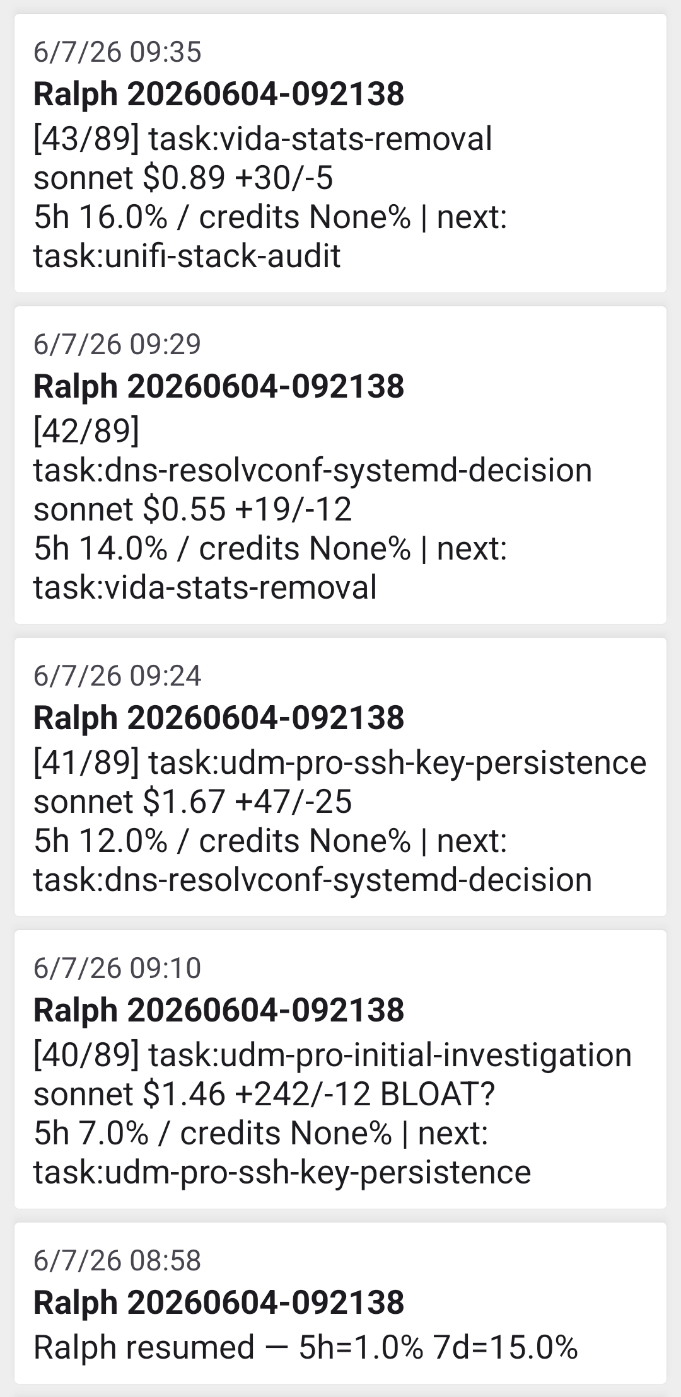
It chewed through the backlog in chunks, paused near my usage limits, and picked back up when the window reset. I came home to a hundred investigations, each scored by risk and impact, each with a recommended first action, waiting on a rainy Saturday and a cup of coffee.
That is as far as read-only takes you. Everything to this point was an agent that could look but not touch, and it still found a dying backup, a dead exporter, and an open door into a server I thought was locked. The next question is what happens when you let it change something - which is where part 2 will pick up.
Insights by Hamilton Turner. Prose by Claude. Claude also helped operate the network this series is about.